

Download Dr.Fone Toolkit – Powerful Data Recovery, Phone Repair & Screen Recording Tool
Overview of Dr.Fone Toolkit
Dr.Fone Toolkit, developed by Wondershare, is a comprehensive utility suite designed for Android and iOS smartphones. The primary goal of the software is to recover deleted files, contacts, messages, photos, videos, and other valuable data with just a few clicks. By connecting your device to a computer via USB, the tool instantly detects the phone, scans its internal storage, and presents a clear list of recoverable items.
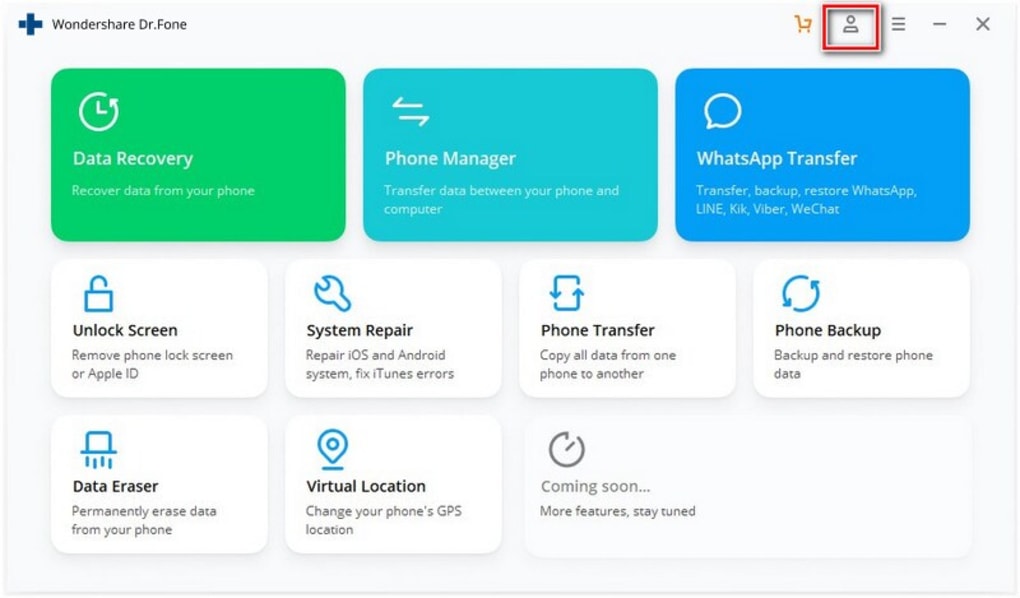
Beyond data recovery, Dr.Fone includes a versatile set of utilities such as phone repair, screen recording, data transfer, and secure data erasure. The interface is clean and user‑friendly, making it accessible for both tech‑savvy users and beginners. While competitors like iMazing, UltData, and PhoneRescue focus mainly on recovery, Dr.Fone differentiates itself with additional features like system repair and remote unlocking, providing a one‑stop solution for most mobile troubleshooting needs.
A free trial is available, allowing users to test the core functions before purchasing the full license. Whether you have accidentally deleted a cherished photo, need to move media between devices, or want to clean up redundant files to boost performance, Dr.Fone Toolkit offers a reliable, secure, and relatively inexpensive option.
Core Features & Advanced Tools
- Data Recovery: Recover deleted photos, videos, contacts, messages, call logs, WhatsApp chats, and more from Android and iOS devices.
- Phone Repair: Fix common iOS/Android system issues such as boot loops, black screens, and stuck devices without losing data.
- Screen Recording: Capture high‑definition video of your smartphone screen directly to your computer for tutorials or troubleshooting.
- Data Transfer: Seamlessly move files, contacts, music, and apps between phones, tablets, and computers.
- Backup & Restore: Create full device backups to iTunes, Google Drive, or local storage, then restore with a single click.
- File Management: Delete unwanted or duplicate files, merge contacts, and free up storage space to improve performance.
- Remote Unlock & Data Wipe: Unlock a locked phone remotely and securely erase all data when you need to sell or recycle the device.
- Cross‑Platform Compatibility: Supports the latest Android 13, iOS 17, Windows 11, and macOS Ventura.
Each feature is built around a simple workflow: connect, scan, select, and recover or manage. The recovery engine uses deep scanning algorithms that can locate files even after they have been removed from the recycle bin, provided the storage sectors are not overwritten. Phone repair tools are updated regularly to cover new firmware releases, ensuring that you can resolve emerging bugs without waiting for a system update.
The screen recorder runs at up to 60 fps, preserving touch interactions and audio for professional‑grade tutorials. Moreover, the data transfer utility supports batch processing, so you can move an entire photo library or music collection in minutes, eliminating the need for third‑party cloud services. Together, these capabilities turn Dr.Fone Toolkit into more than just a recovery app; it becomes a full‑featured mobile maintenance platform.
Installation, Usage & Compatibility
Step‑by‑Step Installation
1. Download the installer: Visit the official Wondershare website and click the “Download for Windows” or “Download for macOS” button. The file size is approximately 150 MB, and the download is secured with SSL encryption.
2. Run the setup: Double‑click the installer and follow the on‑screen prompts. Accept the license agreement, choose the installation folder, and click “Install.” The process takes less than five minutes on a typical PC.
3. Launch Dr.Fone Toolkit: After installation, open the application. The first launch may require you to create a free Wondershare account, which is optional but enables cloud backup features.
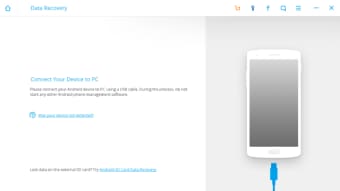
4. Connect your device: Use a high‑quality USB‑C or Lightning cable. Enable “USB debugging” on Android (Settings → Developer options) or “Trust This Computer” on iOS.
Dr.Fone will detect the device automatically.
Using the Software
Once your phone is recognized, select the desired module from the left‑hand menu (e.g., “Data Recovery,” “Phone Repair,” “Screen Recorder”). For recovery, click “Start Scan,” wait for the deep scan to complete (usually 5‑15 minutes depending on storage size), then preview the results. Tick the items you want to restore and click “Recover.” The recovered files are saved to a folder you specify on your computer.
For phone repair, choose the appropriate symptom, follow the guided steps, and let the tool flash the necessary firmware components. The screen recorder works by clicking “Record,” performing the actions on your phone, and stopping the capture when finished. All modules share a consistent UI, minimizing the learning curve.
Supported Operating Systems
Dr.Fone Toolkit is compatible with the following platforms:
• Windows 10, Windows 11 (64‑bit)
• macOS 12 Monterey, macOS 13 Ventura (Intel & Apple Silicon)
• Android 5.0 (Lollipop) and later, up to Android 13
• iOS 11 and later, up to iOS 17
The software also supports virtual environments such as Parallels Desktop on macOS, allowing users to run the Windows version on a Mac without dual‑booting.
System requirements are modest: a dual‑core processor, 4 GB RAM, and at least 500 MB of free disk space for the application itself. For large‑scale data recovery (e.g., 128 GB devices), additional RAM and a solid‑state drive will speed up scanning. The program automatically checks for updates on launch, ensuring you always have the latest device drivers and feature enhancements.
Pros, Cons & Frequently Asked Questions
Pros
- All‑in‑one suite: recovery, repair, transfer, and screen recording in a single package.
- Clean, intuitive interface that reduces the learning curve for beginners.
- High recovery success rate for most file types, especially photos and contacts.
- Regular updates keep up with the latest Android and iOS versions.
- Free trial allows testing of core features before purchase.
- Secure data handling – all operations occur locally on your computer.
Cons
- Full version requires a paid license; pricing may be high for occasional users.
- Recovery may fail for heavily corrupted files or those overwritten by new data.
- USB connection is mandatory for most functions; wireless options are limited.
- Some advanced repair modules need technical knowledge to avoid bricking devices.
FAQ – Your Questions Answered
Can I recover data from a phone that won’t turn on?
Yes. Dr.Fone’s “Phone Repair” module can revive a dead iOS or Android device in many cases. If the hardware is functional, the tool can flash the firmware without erasing user data, allowing you to then run the recovery module.
Is the recovered data stored on my computer or the phone?
Recovered files are saved to a folder you specify on your computer. The original data on the phone remains unchanged unless you choose to overwrite it.
Do I need an internet connection for data recovery?
No. All scanning and recovery processes are performed locally. An internet connection is only required for software updates, license activation, or cloud backup options.
Can Dr.Fone recover WhatsApp messages?
Absolutely. The toolkit includes a dedicated WhatsApp recovery feature that extracts chat histories, attachments, and even call logs from both Android and iOS devices.
What happens if the software cannot detect my device?
First, ensure USB debugging (Android) or trust this computer (iOS) is enabled. If detection still fails, you can import a previously created iTunes or Google Drive backup into Dr.Fone, allowing the tool to scan the backup file instead of the physical device.
Conclusion & Call to Action
Dr.Fone Toolkit stands out as a robust, multi‑functional solution for anyone who needs to retrieve lost data, repair a malfunctioning phone, or simply manage mobile storage more efficiently. Its blend of recovery accuracy, system repair capabilities, and added utilities like screen recording makes it a worthwhile investment, especially for power users and small businesses that handle multiple devices. While the price point may deter occasional users, the free trial provides ample opportunity to verify that the tool meets your specific needs before committing. If you’re looking for a secure, easy‑to‑use, and regularly updated software suite that goes beyond basic recovery, Dr.Fone Toolkit is a compelling choice.
Download Dr.Fone Toolkit now and start the free trial to experience seamless data recovery, phone repair, and more. Protect your memories and keep your device running smoothly – all with one powerful application.
Dr.Fone Toolkit delivers a well‑rounded experience for data recovery and device maintenance. Its comprehensive feature set, reliable performance, and user‑friendly design earn it a solid 4.5‑star rating.







